00What it looks like
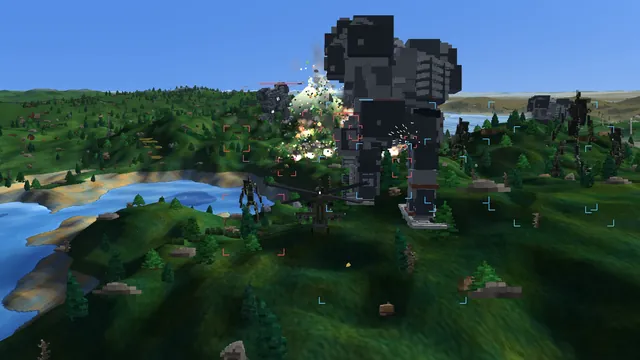
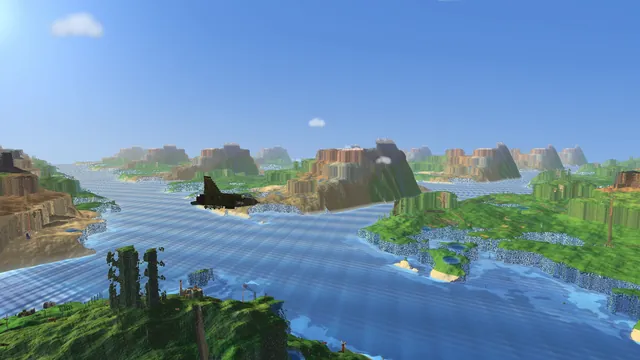
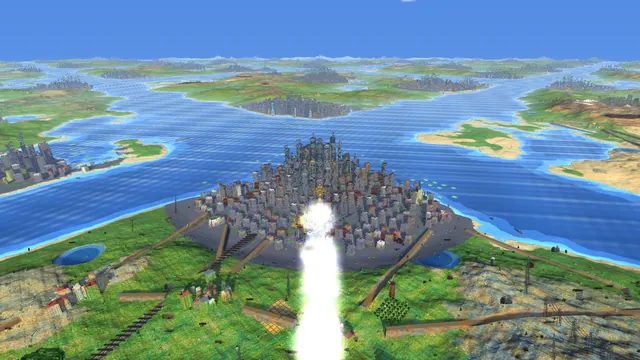
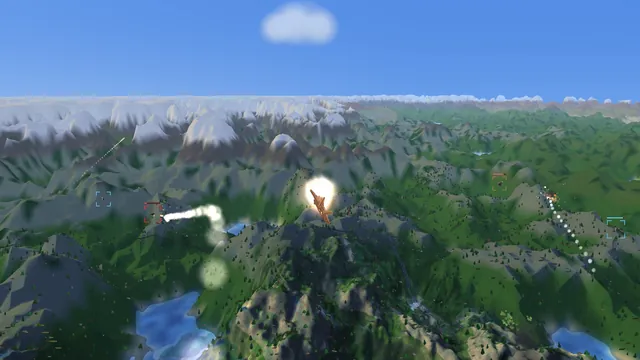
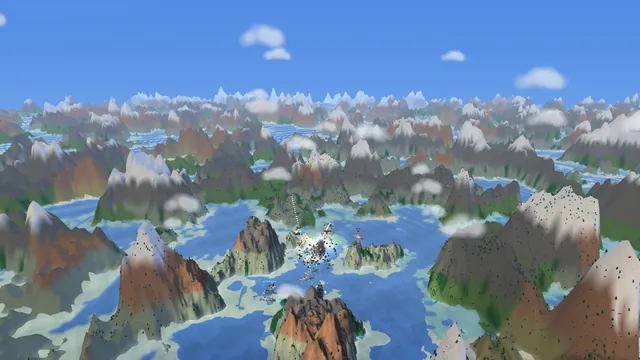
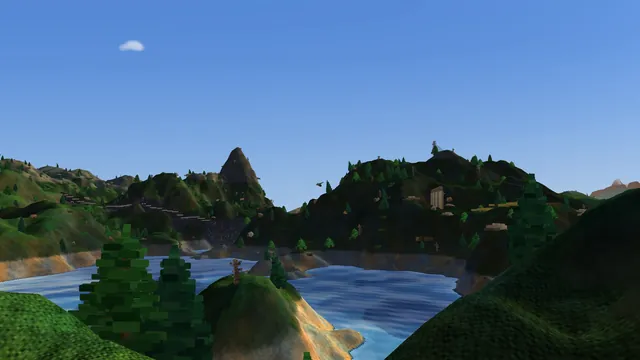
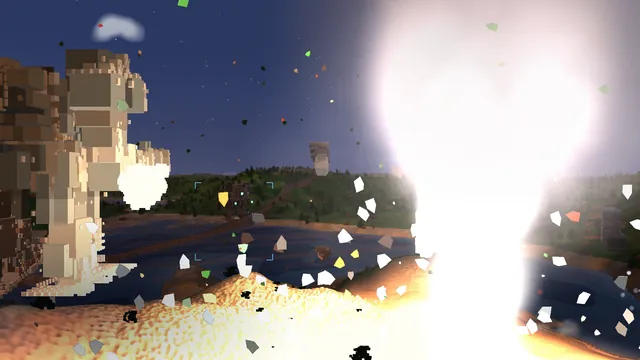
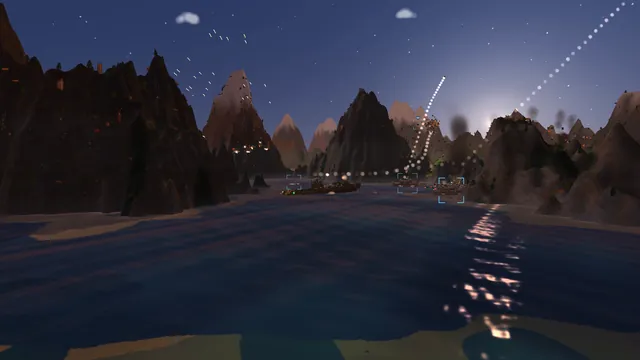
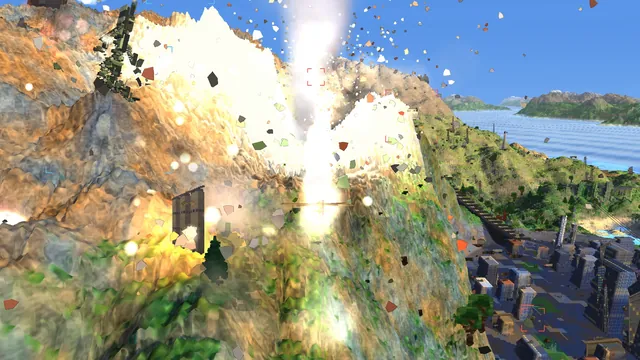
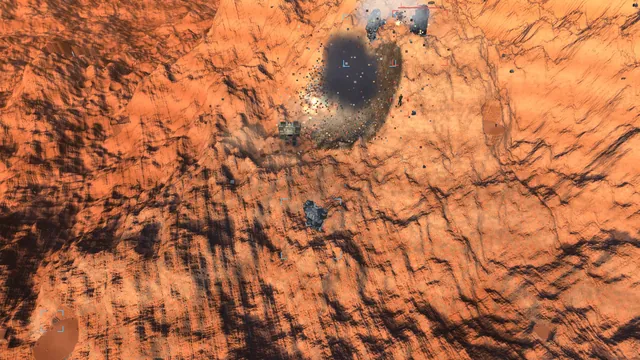
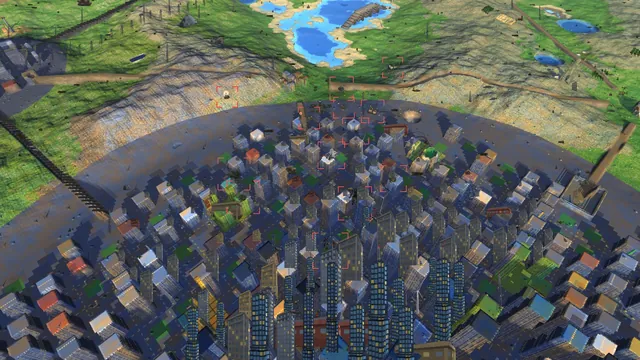
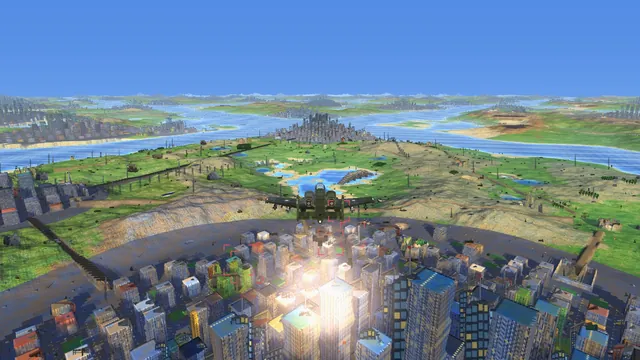
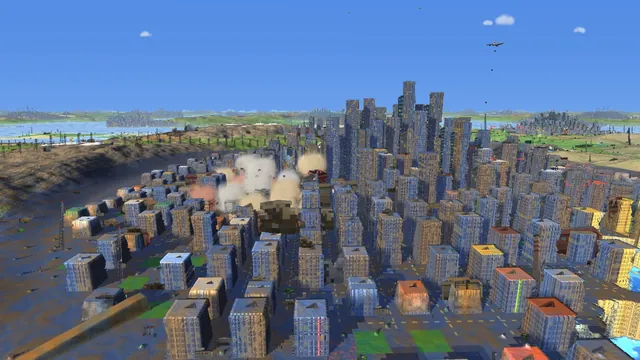
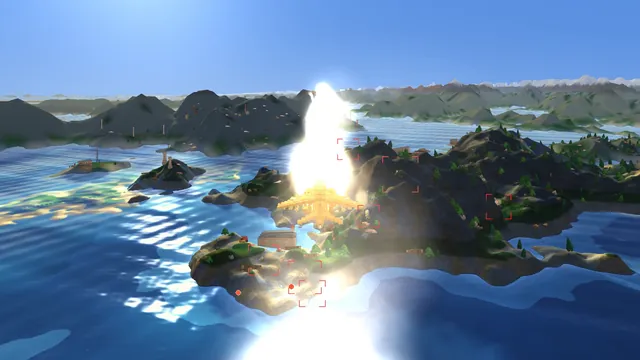
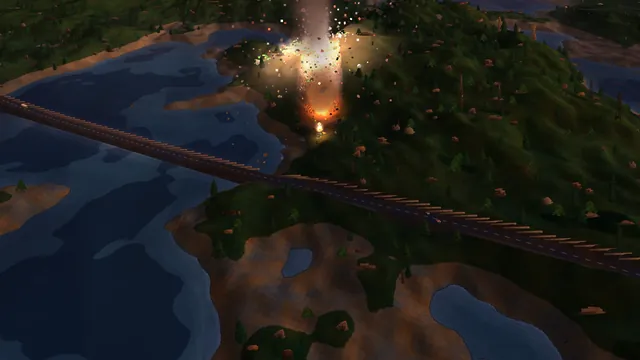
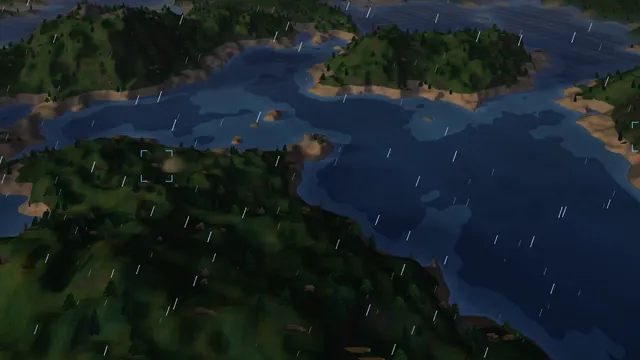
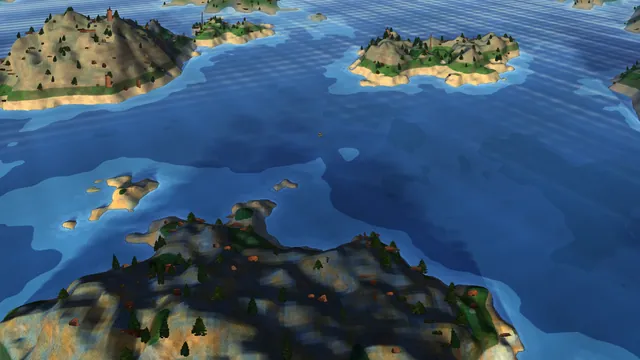
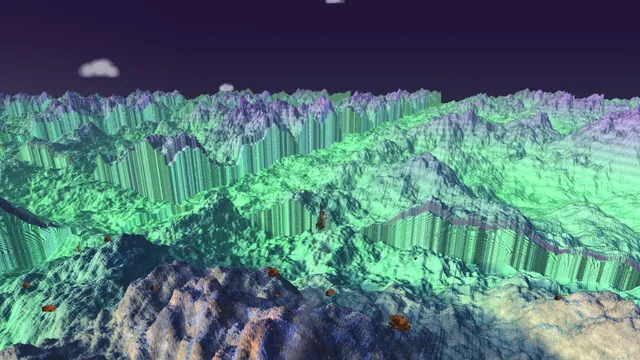
Every picture here is a real frame from the game, drawn by the graphics card at full HD (1920×1080). They come from the camera shots the trailer tool records (section 14), with no colour correction or retouching. You can watch the finished trailer at the end of section 14 and browse every vehicle on the showcase page. Click any picture to see it full size.
01What the game is made of
VoxelStrike is an arcade war game. You can fly helicopters and jets, drive tanks and boats, pilot giant walking robots, and land on an aircraft carrier and take off again. You fight a computer-controlled army across open country, cities and sea, or play against friends over a home network.
It is written in Python, a programming language known for being easy to write and slow to run. A few free libraries do the heavy lifting: pygame opens the window and reads the keyboard, moderngl talks to the graphics card, and numba translates the busiest parts of the code into fast machine code, close to the speed of C. A one-click launcher sets everything up on a new PC.
There's no game engine underneath. Most games are built on Unity or Unreal, which provide the drawing, physics and sound. Here, all of that was written for this game: 56 files and 107,962 lines. The biggest pieces are the code that builds the vehicles (24,013 lines), the code that runs a game session (16,972) and the graphics code (8,819). There are 80 vehicles you can use, 85 weapons and 47 kinds of enemy.
Because Python is slow, the whole design follows one rule: Python makes the decisions, and the heavy, repetitive work goes to fast compiled code or to the graphics card. Drawing the ground, building the world, moving thousands of bullets, checking what can see what, choosing targets and the helicopters' rotor physics all run as compiled code. Everything drawn in bulk, like the ground, trees, vehicles, smoke and power lines, goes to the graphics card in about 25 batches per frame. Python keeps the parts that need thinking: the rules, the enemy's tactics, the on-screen display and the missions.
The project started on 31 May 2026. By 30 September it had 1,307 saved changes ("commits") across 72 working days. It was built by one developer working with an AI coding assistant, and that working method gets as much space here as the game (section 12).
Frame: one picture on screen. Games draw 60 or more a second, so each frame has about 16.7 milliseconds (ms). A frame that takes much longer is a visible stutter.
CPU and GPU: the computer's main processor, and the graphics card. The GPU is very fast at doing the same simple job for millions of pixels at once.
Height map: a grid of numbers, one height per square of ground, like a topographic map. A colour map is the matching grid of colours.
"99th percentile" (p99): the frame time that 99 frames out of 100 beat. It measures the bad frames, not the typical ones.
02How the ground is drawn: the 1992 trick
Most 3D games build their landscapes from millions of small triangles. VoxelStrike doesn't. Its ground is just two images: a height map (how high each spot is) and a colour map (what colour it is). The 1992 game Comanche turned those two images into a 3D view with a clever shortcut called Voxel Space.
Here is the idea. Take one vertical strip of the screen, one pixel wide. Walk outward from the camera across the map in that direction, a step at a time. At each step, look up the ground's height, work out where that height would appear on screen, and paint the strip up to there in the ground's colour. Because you walk from near to far, anything closer has already been painted, so a hill automatically hides whatever is behind it. You only paint the part that sticks up above what's already there. Once the strip is full to the top, you stop. Do that for every strip across the screen, and you have a landscape.
VoxelStrike's first renderer did exactly this on the main processor, and it's still in the game as a backup and for the automatic tests. Each screen strip is independent, so every processor core takes its own strips at the same time. The steps start small, so the ground right under a low tank is drawn in fine detail, and get longer with distance, where detail doesn't show. Far away, the program switches to a lower-detail copy of the map and blends the two, so there's no visible line where the detail changes.
Most of what makes it look good came from fixing specific things players noticed:
- Buildings "shape-shifted" as you approached. At a sharp edge, like a cliff or a wall, the program picked whichever map square was closest, and that choice flipped back and forth as the camera crept forward. Now it always uses the tallest square, so edges stay still.
- The ground seemed to crawl under a slow tank. Colours snapped from one square to the next. Now smooth ground blends the four nearest colours, and only sharp edges stay crisp.
- Looking down from high up looked warped. The original 1992 method assumes the camera looks straight ahead. The maths was extended to handle tilting the view down, without changing the picture when you fly level.
- Haze and fog thicken with distance the way real air does, plus low mist pools over water and valleys. The graphics-card version uses the exact same formula, so both versions agree on the weather.
The limit of the trick is that each spot on the map has just one height. So there can be no overhangs, no bridges you fly under, and no caves. Buildings are simply tall spots on the map with their own colours. Anything that must be a true 3D object, like vehicles, trees and flying debris, is drawn separately on top.
03Moving it to the graphics card
Painting every pixel of the landscape on the main processor, then sending the finished picture to the screen, was too slow. The graphics card is built for exactly this kind of work: the same small job for every pixel, millions of times, all at once. The move started on 6 June, and four days later the ground was being drawn by a small program that runs on the graphics card for every pixel (a shader).
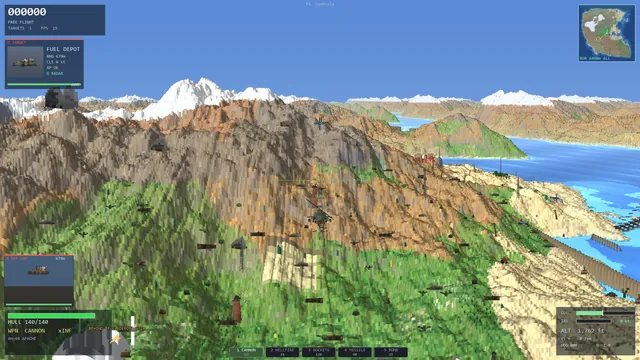 Main processor · the original method
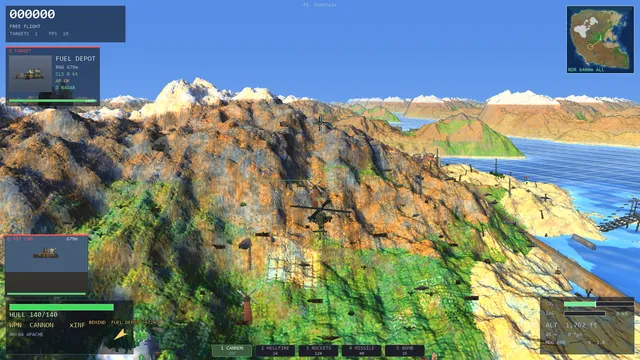 Graphics card · today's method
The same world, helicopter and camera angle, drawn by each version. The ground and scenery match. The graphics-card version adds finer ground detail, properly shaded vehicles and a soft glow around bright spots.
How the graphics card finds the ground
Instead of one walk per screen strip, the graphics card now does one walk per pixel. Each pixel sends an imaginary line out from the camera and steps along it until it hits the ground. The trick that keeps this fast: if the line is, say, 100 metres above the ground, it can safely jump ahead a good distance, because it can't hit anything sooner. So it takes big leaps through open air and small careful steps near the ground. A special check near walls stops it jumping straight through the side of a skyscraper; before that fix, distant towers had strange blue slices cut out of them.
Each pixel is allowed up to 1,200 steps. In practice a jet at height uses about 45 steps per pixel on average, and a helicopter flying low about 146. No pixel has ever needed the full 1,200.
The graphics card also records how far away each pixel of ground is. That lets it draw vehicles, trees, smoke and power lines afterwards and automatically hide any part that's behind a hill. This matters again in section 11.
A standard technique called "hi-Z" keeps a simplified copy of the map to help the lines skip empty space faster. It was built and measured, and it made drawing slower in every test, by 2% to 27%. The big leaps through open air were already doing the same job, so the extra copy only added work. It's switched off, and it's written down so nobody turns it on expecting a gain.
Only send what changed
The first version of the endless world sent the entire map, about 112 MB, to the graphics card every frame. The frame rate fell from 40–50 frames per second to 1–4. Now only the new strip of land is sent as it arrives, and an explosion sends only the small patch it changed. A later bug brought the old problem back in disguise: once you had flown far enough from the start, the game thought every new crater crossed the edge of the map, and sent the whole 100 MB map again for each one. Fixing that made those frames about three times faster.
04Where the time goes in each frame
A measuring tool plays the real game and times each step the graphics card takes to draw a frame. Measured on 16 September, in milliseconds per frame (remember that 60 frames a second allows about 16.7 ms in total):
| What the graphics card draws | Big fight, full HD | Battle, full HD | Jet, full HD | Big fight, 4K |
|---|---|---|---|---|
| the ground and sky | 3.41 | 1.49 | 0.99 | 7.67 |
| the on-screen display, sent as a full-screen image | 1.13 | 1.13 | 1.10 | 4.38 |
| clouds and sun, sent as a full-screen image | – | 1.14 | 1.13 | – |
| all vehicles, trees, smoke and power lines | under 0.05 | under 0.02 | under 0.02 | under 0.05 |
| total | 4.7 | 3.8 | 3.3 | 12.1 |
Three things stand out. First, the graphics card wasn't the problem at full HD: it needed 3–5 ms, while the main processor needed 10–13 ms for its share. Second, all the vehicles, trees and smoke together cost almost nothing, because each kind is sent to the graphics card as one batch. Third, a surprising share of the graphics card's time went on full-screen images the main processor painted and sent over every frame. At 4K, those cost more than drawing the whole landscape.
When the armies get big
Those figures were for everyday fights. To see how the game copes as a battle grows, a scaling test plays the same fight with more and more units and splits each frame into the game's logic (every unit thinking, moving and shooting) and drawing (the main processor preparing the picture for the graphics card). On the developer's desktop, before and after a day of work on 30 September:
| Units in the fight | Frame, before | Frame, after | Logic, after | Drawing, after |
|---|---|---|---|---|
| 54 | 13.1 ms · 76 fps | 10.1 ms · 99 fps | 3.9 ms | 6.0 ms |
| 108 | 23.4 ms · 43 fps | 16.5 ms · 60 fps | 7.2 ms | 9.1 ms |
| 212 | 42.1 ms · 24 fps | 31.5 ms · 32 fps | 16.0 ms | 15.2 ms |
The typical frame as the game plays it (the graphics card draws one frame while the
processor prepares the next), "balanced" preset, full HD, machine_bench.py --scale. Single runs vary by
about 1.5 ms.
The graphics card still isn't the limit: at 212 units it needs about 10.5 ms, 6.4 of it for the ground, and all 97 vehicles together take under 2 ms. The time goes on the main processor, split roughly half and half between the logic and preparing the picture, and both halves grow with the number of units.
Compiling the busiest Python, one piece at a time
The plan was never a rewrite. Timers find the single most expensive piece of Python in a big fight; that piece is translated to compiled code; and the new version has to give exactly the same answers as the Python it replaces, down to the last digit, checked on hundreds of thousands of inputs and on whole recorded fights. Only then does it replace the original. What that found, in order:
- Choosing targets. Every unit weighed every enemy unit to pick the most dangerous one it could reach, about 20,000 comparisons a frame at 200 units, and the biggest single cost in the logic. The catch: units move one at a time, so each one sees the others where they've already moved to this frame. The compiled version keeps its table of positions up to date as each unit moves, and picks exactly the same targets.
- The enemy's helicopter physics. The same rotor model the player flies, so every flight had to come out identical: 320 test flights (80 vehicle designs, each flown four different ways) matched the old code on every number, every frame.
- Ground lookups, tyre marks, finding units that touch, posing the walking robots. Smaller pieces, each a straight swap.
Just as useful was what not to compile. The robots' walking code costs about 25 microseconds per robot, but spread over 150 lines of decisions (when to jump, where to step round an obstacle, when to play a footstep). Compiling it would mean rewriting how the robots walk to save about a millisecond, so it was measured and left alone.
Taking the full-screen images off the main processor
An explosion's flash, a storm darkening the sky, lightning and the red flash when you're hit were each a full-screen picture that the main processor painted pixel by pixel, at 3.75 ms each at full HD. Now they're simple settings the graphics card applies as it draws. There was a bug hiding here too: the sun had been painted onto a see-through layer in a way that left it completely invisible, so there had never been a visible sun in the graphics-card version. It's drawn properly now, and clouds sit correctly behind mountains. The on-screen display is only re-sent where it changed.
The result in a thunderstorm: drawing time fell from 16–20 ms to about 10 ms at full HD, and from 38–56 ms to 10–14 ms at 4K. Data sent to the graphics card each frame fell from 8–17 MB to 1–2 MB, and stuttering frames (over 33 ms) fell from 214 to 42.
Lower resolution that still looks sharp
Since the ground's cost depends on the number of pixels, a slower graphics card can draw at a lower resolution and scale the picture up. The game uses FSR 1, AMD's free upscaler, which keeps far more fine detail than simple stretching and costs under half a millisecond at full HD. A built-in manager now watches how busy the graphics card is and lowers the resolution only when the graphics card is actually the bottleneck. Its first version didn't check that and lowered the resolution in a battle where the main processor was the slow part, which made the picture worse for no gain.
Once the graphics card had less work, it started saving power by slowing itself down, and the same drawing step measured 3.2 ms at one moment and over 7 ms at another. A graphics card that's resting can look like a slow one. Any automatic quality setting has to tell the difference.
Why not DirectX or Vulkan?
Newer graphics systems like DirectX 12 and Vulkan mainly reduce the cost of sending each batch of drawing work. This game sends only about 25 batches a frame, so there's little to save. The real costs, drawing the ground's pixels and running Python, would be the same. Switching would mean rewriting all the graphics code for almost no speed gain, so the game stays on OpenGL, which runs on nearly every PC.
05A world that doesn't end
In the streamed worlds, you can fly in any direction for hundreds of kilometres without reaching an edge or seeing the land repeat. The ground is made from layered random noise, the standard way games create natural-looking terrain, with extra shaping for sharp ridges and stepped mesas. Slow-changing "dials" across the world decide where it's flat, mountainous, forested or cut into mesas, in regions about 9 km across, so a long flight crosses real changes of scenery.
The game only keeps the land around you in memory, in a window that moves with you. That window wraps around at its edges (leaving on the right brings you back in on the left), which makes it cheap to slide along. Vehicles and soldiers, though, must not wrap. Before that was fixed, a unit placed far out could be "teleported to the far side of the world".
Why helpers, and not threads
Python has a well-known limitation: within one program, only one piece of Python code can run at a time. Building land in a background "thread" of the same program was hopeless. One strip of land took 4.8 seconds there, against 0.14 seconds when the game did it itself. So the land is built by a separate helper program running alongside the game, and the two share a block of memory. An earlier version passed data through a channel where each side waited for the other, and once both waited at the same time, freezing the game for 97 seconds. With the helper, a jet flying at full speed got 135 of 136 new strips of land ready in advance, and picking one up cost less than a fifth of a millisecond. Before, the same flight had frozen for 1.3 seconds at a time.
The horizon is real
Beyond the detailed area around you, a low-detail copy of the same land stretches out to the horizon. It uses only 7.3 MB, and its outline differs from the real mountains by less than a third of a pixel. Reaching that far with full detail would have needed 793 MB and about 45 seconds to build. So the mountains in the distance aren't a painted backdrop: they're the actual mountains you're about to fly over.
The fixed maps
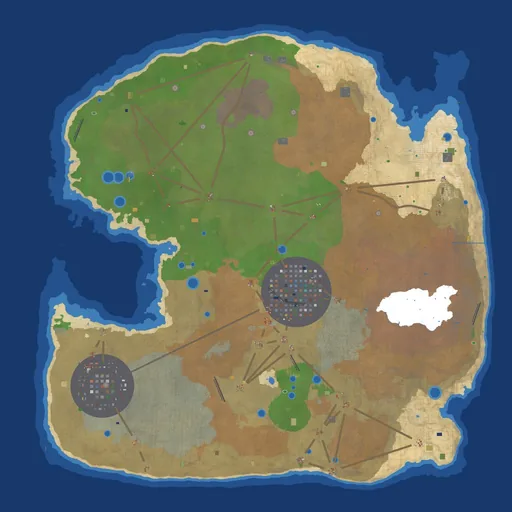
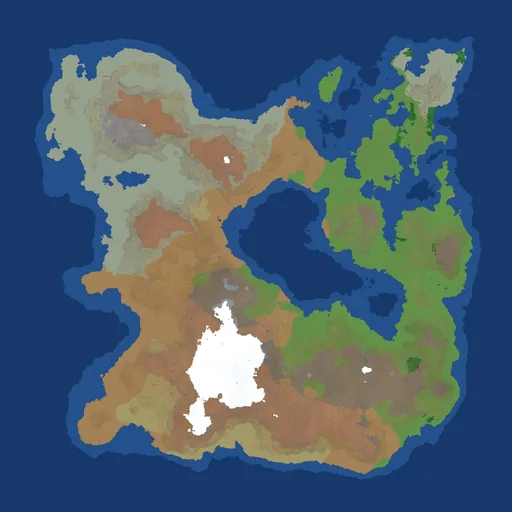
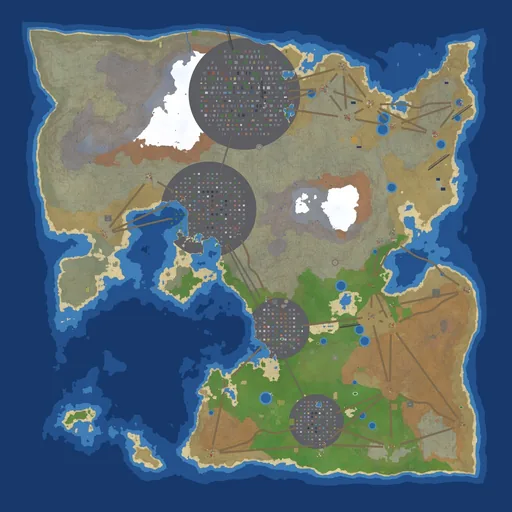
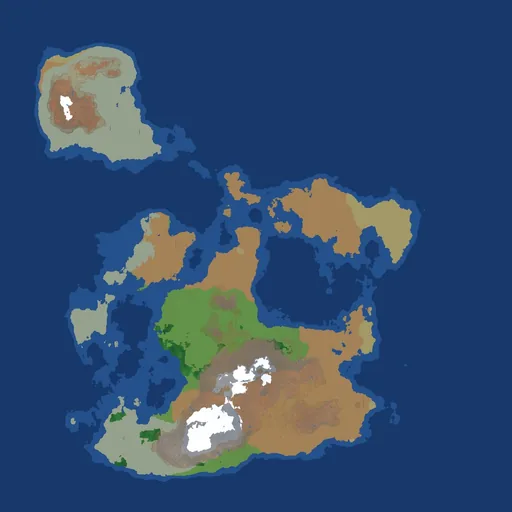
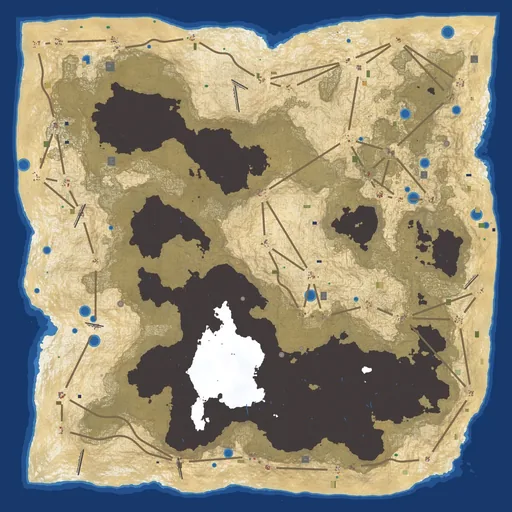
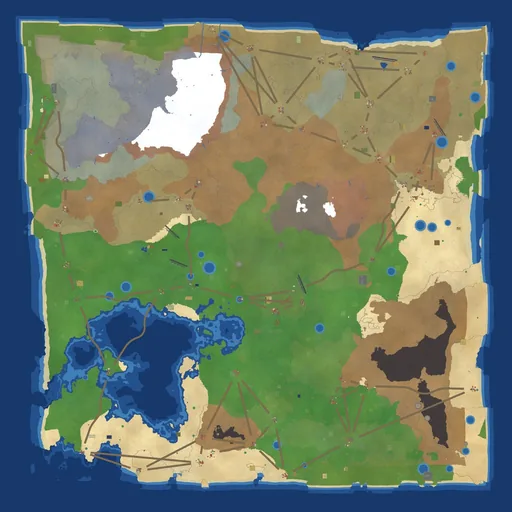
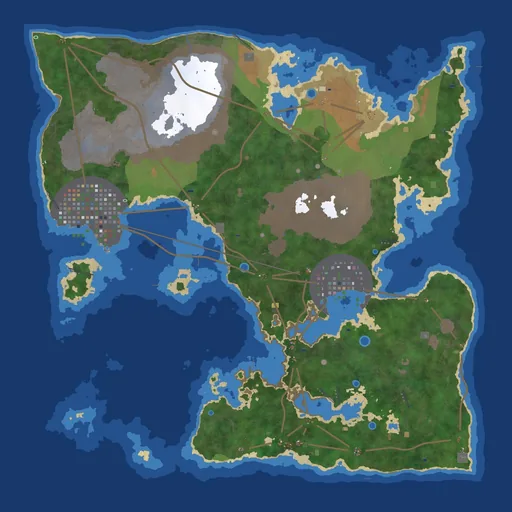
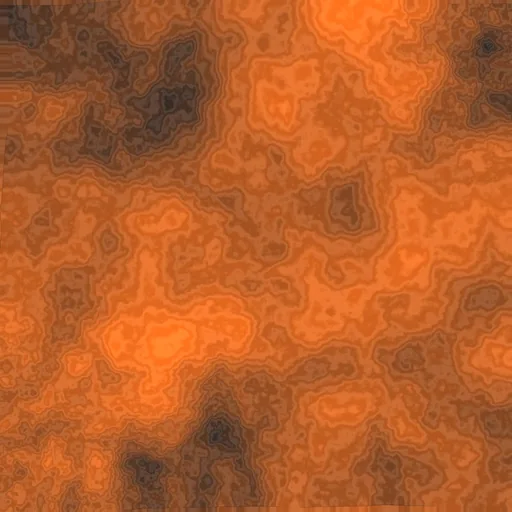
Eight of the fixed maps seen from directly above. These are the actual colour maps the game draws the ground from. The grey circles are cities.
Alongside the endless worlds there are fixed maps like these, each built from a recipe: random noise, shaped into islands, then water, landscape types by height and slope, forests and cities. They also get a smoothing pass that wears down spiky peaks, a bit like erosion. In multiplayer the map itself is never sent over the network. Each player's computer receives the recipe and builds the identical world itself.
On 19 August, a change let the land be built in the background with a speed limit of about 4 strips per frame. A fast jet needs about 27. So the jet flew off the edge of the built land, and the developer reported "I couldn't even see a mountain". Yet all 348 automatic tests passed. Every test checked that the land was built correctly and quickly; none actually flew a jet and asked "is there ground in front of me?". That test exists now, and it was run against the broken version to prove it catches the problem.
06Hunting down stutters
Most frames in a jet were fine. The trouble came in hitches every time the jet crossed into new land: frames of 63–111 ms, when 17 ms was normal, and 103 of them in one flight. A dedicated tool plays the game at a steady 60 frames a second, records every slow frame and lists exactly what the game was doing during it. It found eleven separate causes:
| What was happening during the slow frame | ms | How it was fixed |
|---|---|---|
| the list of all 19,105 visible trees thrown away and rebuilt from scratch | 26–50 | add and remove only the trees that changed |
| building the trees, houses and roads of new land | 17–55 | moved to a helper program, 2 seconds ahead |
| extending the horizon, then re-sending all 7.3 MB of it | 5–15 + 3–5.5 | built by the helper; only new parts sent |
| shading new land | 3–6.4 | one fast compiled step |
| traffic looking up nearby roads | 8–12 | looked up once per area, in advance |
| filling a town with people | up to 14 | at most 64 new people per frame |
| drawing the picture of a new kind of tree or prop the first time it appears | 7–17 | prepared while the land is on its way |
| the collection of those pictures outgrowing its space and being rebuilt | 25 + 125 | new pages added; nothing is rebuilt |
| building a 3D model the first time it's seen | 28.7 | built on the loading screen |
| creating an enemy robot's footstep sound the first time it walks | ~50 | created on the loading screen |
| compiled code being loaded the first time it's used | 7.4–159 | loaded on the loading screen |
The same tests, run twice each before and after (900 frames each, full HD):
| Scene | 1 frame in 100 is slower than (ms) | slowest frame (ms) | frames over 33 ms | over 50 ms |
|---|---|---|---|---|
| jet, before | 74.4 / 72.0 | 334.9 / 328.3 | 45 / 41 | 32 / 29 |
| jet, after | 21.9 / 22.0 | 44.0 / 27.2 | 2 / 0 | 0 / 0 |
| battle, before | 70.7 / 66.6 | 915.4 / 176.9 | 64 / 63 | 21 / 20 |
| battle, after | 34.3 / 34.0 | 62.6 / 57.6 | 11 / 11 | 2 / 1 |
Not every idea worked. One well-known trick for sending images to the graphics card faster was tried here, measured as slower (22.5 ms per frame instead of 17.3), and removed. An idea that sounds right still has to prove it.
Waiting less before you play
Loading time counts as waiting too. Starting the game took about 5 seconds and the first mission about 39. Three changes brought that to about 1.5 seconds to start and about 13 for the first mission. The vehicle models and the sound effects, built from code, are now kept on disk after the first time and rebuilt automatically when the code that makes them changes. The land of a new map is filled in on several processor cores at once. And the compiled code is saved to disk too; that needed a trick of its own, because a common way of calling a C function from compiled code quietly stops it being saved, which would have added two seconds to every start.
Python can hand out a quick ID number for any object, but once an object is deleted, a new one can get the same number. A test counting missiles by those IDs reported 15 alarms for 2 missiles, when really 8 missiles had been merged into 2. The same mistake later nearly made 12,791 trees draw with the wrong pictures. Everything now gets its own permanent serial number.
07Vehicles built from boxes
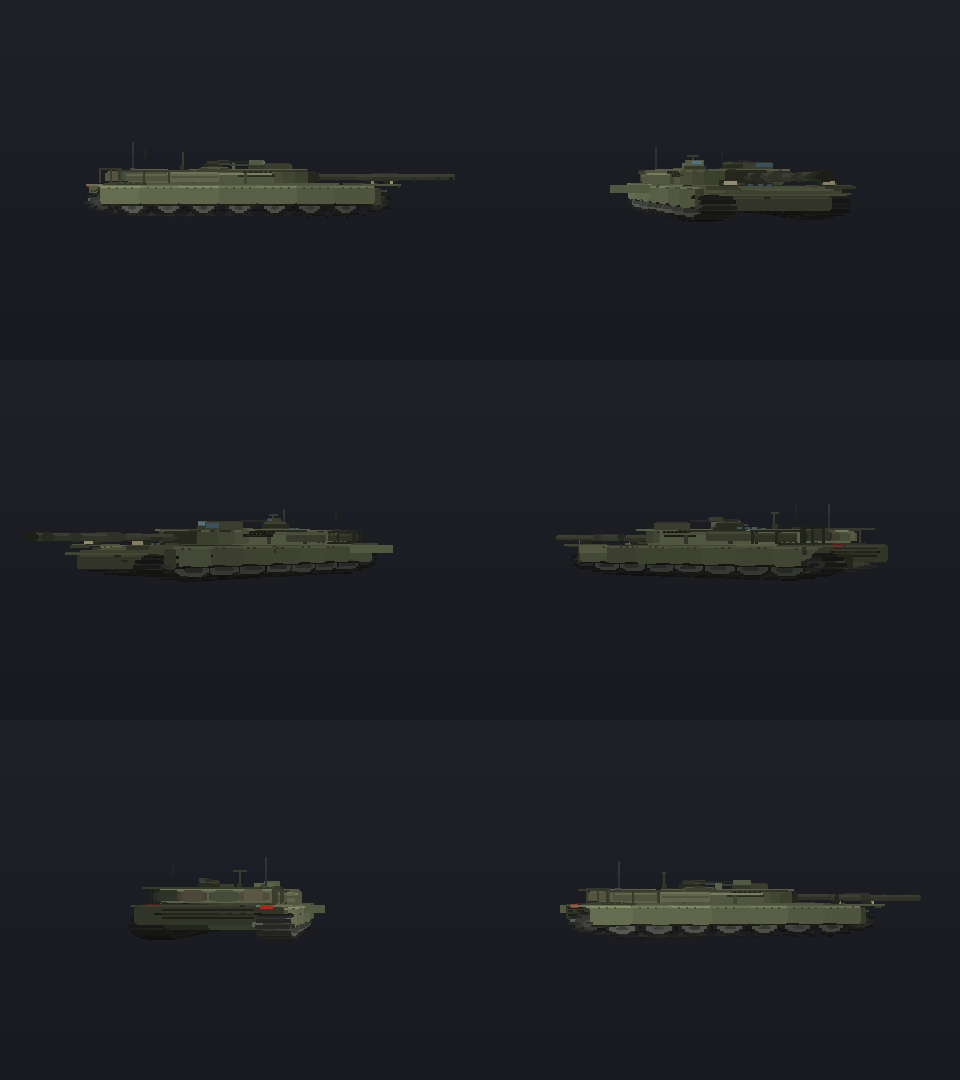
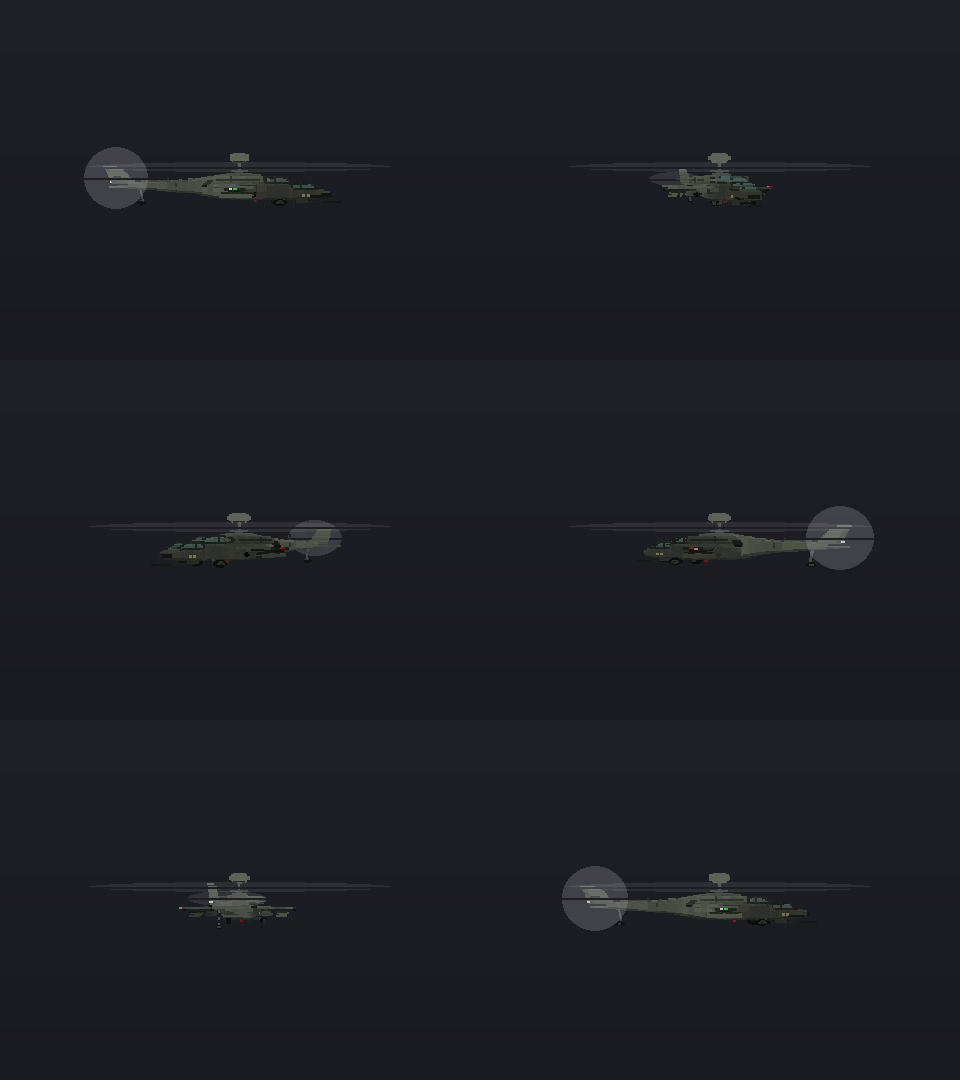
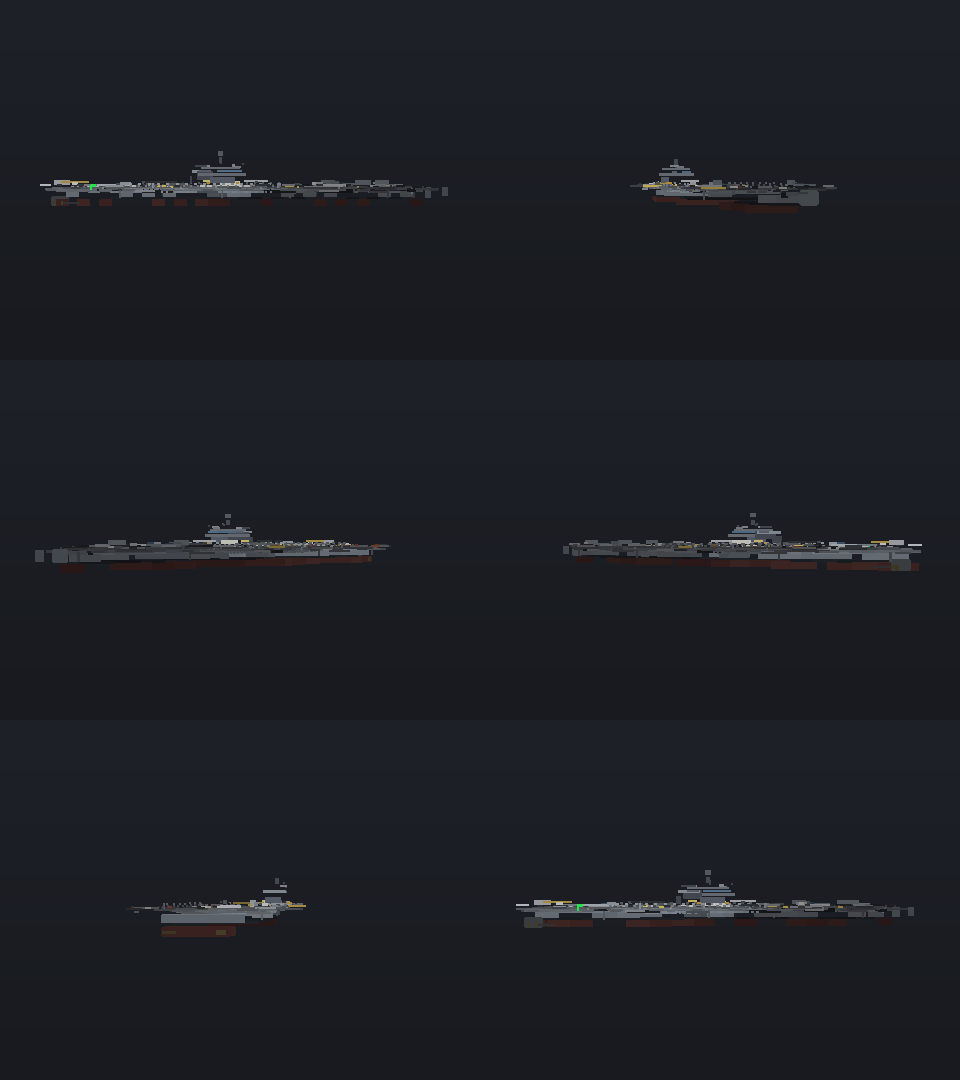
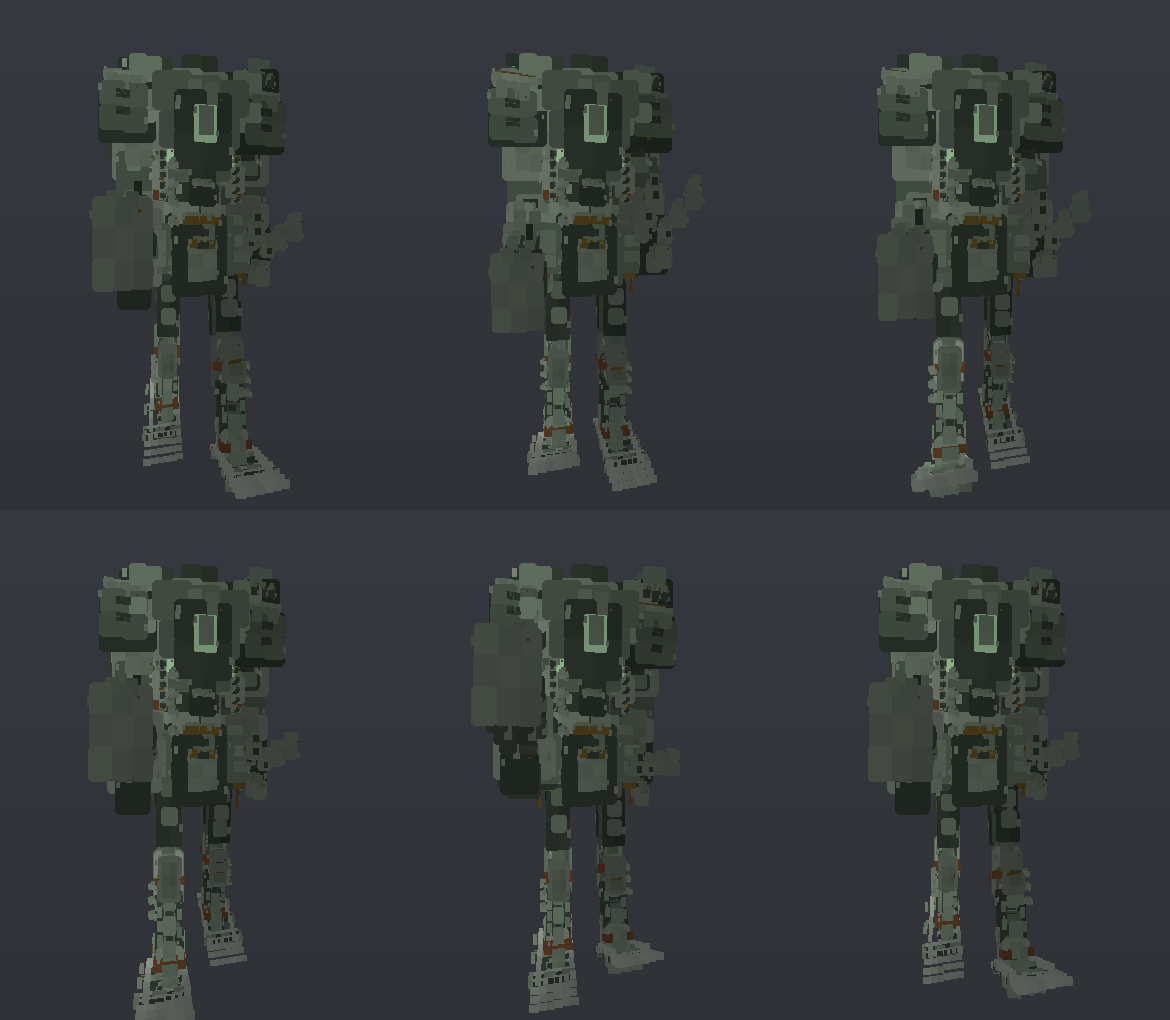
A tank, a helicopter, a carrier and a giant robot, rendered from the game's current models. Each is built from code every time the game starts.
Every vehicle is made of small boxes, a bit like LEGO, and each one is described by a short piece of code rather than a model file. The model code holds 441 of these recipes. A recipe lays out the main panels; the game then joins them up, splits them into smaller boxes and tidies up thin slivers, up to a limit per vehicle type (about 1,400 boxes for most vehicles, up to 6,000 for big ships and 9,000 for the giant robots). A final pass adds the small details each kind of vehicle is recognised by: tank tracks, rails, canopy frames, navigation lights. A Falcon jet goes from 84 boxes as written to 1,400 in the game.
The graphics card draws all of a vehicle's boxes in one go. At first each box was drawn as a flat square facing the camera, which looked like a cardboard cut-out up close. Now each box is drawn as a real box with three lit sides, which still costs only a fifth of a millisecond for 54 vehicles. Moving parts like rotors, propellers, wheels, tracks, radar dishes and recoiling gun barrels are moved by telling the graphics card a few numbers each frame, not by rebuilding the model. Skipping numbers that hadn't changed cut that traffic from 240 updates to 29.
An obvious next step would be to draw every tank of one type in a single go. Counting first showed why it doesn't work yet: in a 207-unit fight there are 84 vehicle drawings a frame, but only 12 share a model. A tank turns its turret by keeping its own adjusted copy of the model, and each walking robot is posed into its own copy, both prepared by the main processor. Batching needs that turret and leg movement done by the graphics card first. For now, a posed robot sends the graphics card only the 6 numbers per box that a pose changes (where each box is and which way it faces), not all 17.
08Damage you can see
The developer's request was about feel: "when we're hitting other vehicles … there should be some more impact type feel to it … I want to have a little more oomph". To turn "more oomph" into something that could be checked, a hit was filmed and the number of pixels it changed on the target was counted:
| Weapon | Pixels changed on the target, before | After |
|---|---|---|
| rifle | 0 of 30,905 | light rounds: 6.2% of the target, 150 pixels of debris |
| autocannon | 105 (0.3%) | |
| tank shell | 1,381 (4.5%) | 19.3%, 1,125 pixels of debris |
| armour-piercing dart | 1,547 (5.0%) | 19.3%, 1,855 pixels of debris |
So a rifle hit used to leave no visible mark at all. Now each vehicle remembers up to six hits. At each one the paint is scorched off, the plate is dented, a hole is punched through, and the vehicle rocks on its springs: 1.5° for a light round, 3.9° for a tank shell. Before this, damage was a single number that darkened the whole vehicle evenly. The giant robots can lose arms and legs as they take damage. Each lost limb used to be built the moment it was blown off, a 2–7 ms hitch, and a big fight had 28 of them in ten seconds. Now every limb a robot on the field could lose is built once, on the loading screen, and shared by all robots of that type.
Two days later, the measurement itself was checked. Part of the change counted in the table was debris flying off, not the scar on the vehicle. With the debris switched off, the scar alone accounted for 160 pixels. The lesson: to measure something partly see-through, like smoke or a scorch mark, compare the picture with it and without it.
Destruction that stays
Explosions dig craters into the ground, set the trees and buildings on them to match, and write down what happened, so the damage is still there when you fly away and come back. A bug once brought a destroyed hangar back to life: after you left and returned, it stood whole on top of its own rubble and could be blown up "again, and again". The game had remembered it by one of Python's reusable ID numbers. Now it's remembered by what it is and exactly where it stood. The developer's first guess, duplicated buildings, was checked and ruled out: 2,506 buildings, 2,506 different positions.
09Flying, driving, floating, and the enemy
Each kind of vehicle moves by its own rules:
- Helicopters use a real rotor model, built from the same published formulas engineers use. It covers the extra lift near the ground, the dangerous "vortex ring" state when you descend too fast into your own downwash, and autorotation, where a helicopter with a dead engine glides down on its freely spinning rotor. It gives the same result at 30 or 480 frames a second; the model it replaced drifted 34 units apart over 10 seconds depending on the frame rate.
- Planes generate lift from their angle to the airflow and stall when too slow. The slower you are, the harder the nose drops.
- Ground vehicles sit on four springy corners, so they pitch when braking, roll in turns, bottom out over bumps, and grip differently on grass, sand, rock and road.
- Ships float on the same three sets of waves that are drawn on the water. A long ship averages out short waves, so a destroyer barely notices chop that throws a small patrol boat around.
- Giant robots walk, and can fold up into vehicles.
Players disagree about which way is up. Some want a real flight stick, where pulling back raises the nose; others want "up" to mean up. One setting, which F4 also flips in flight, now applies to jets and helicopters alike, and making it showed that the two had disagreed: in a helicopter, "up" had been lowering the nose.
Most bugs here were mix-ups of units, not bad physics. A boat's acceleration was accidentally tied to its speed, and it topped out at 58% of its real top speed. A landing rocket's firing height was written as a speed, so when gravity was changed, the rocket fired at the wrong height. That happened five times before it became a written rule. And a gunship once started the game 80 units inside a mountain and flipped over on the very first frame.
How the enemy thinks
A review of the enemy's behaviour on 3 September started by measuring it: 2 of 18 ground vehicles were permanently stuck. Each had exactly one direction it could choose, and if that pointed up a steep hill, it pushed against the hill forever. Giant robots stood up once and never folded back down. Nothing decided to flank, hold a ridge or retreat; every unit simply drove at its target.
Now each enemy has a plan: advance, flank, hold, withdraw, regroup or reposition. It rethinks that plan every half-second to second and a half, and units take turns so they don't all think on the same frame. When moving, a unit tries nine directions and takes the first good one. Afterwards, stuck units fell from 5 of 53 to 1 of 53, and units switched plans more often (1.89 different plans each on average, up from 1).
The enemy also plays fair. Every unit, on both sides, can only shoot what it could really see: you must be in front of it, not behind a hill, and in range, for long enough for it to react. So there are no shots through mountains and no eyes in the back of its head. The difficulty levels change how sharp the enemy is, not just how hard it hits: an easy enemy rethinks every 1.6 seconds and takes 1.4 seconds to react, a hard one every 0.6 seconds and 0.5 seconds. Badly damaged, 40% of easy enemies retreat, and none of the hard ones do.
Seeing the enemy matters as much as the enemy seeing you. Turrets, missile sites and guns were placed at the height of the ground under their centre and drawn perfectly level, so on a hillside every rise under them covered part of them: on hilly maps about 1 in 4 was hard to see, and a flat artillery piece could show a quarter of itself. They now tilt with the slope, sit clear of the highest ground under their whole base, and move to flatter ground nearby rather than hang off a cliff edge.
10Sound made from scratch
Almost every sound is generated by code when the game starts, not played from a recording: every vehicle's engine, every weapon according to its size, and every hit according to what was hit, whether the shot bounced off or went through, and how big the gun was. The rumble of tyres and tracks changes with the ground, and footsteps change with weight. The one exception is speech: 127 voice lines (mission briefings, radio calls) were generated with text-to-speech ahead of time and ship as recordings.
Two sound bugs changed the rules for the whole project. First, every engine sounded the same. The code meant to keep only the deep, low sounds couldn't actually reach low enough, so every "rumble" came out as a mid-range hum. It was replaced with a proper filter. Second, loading the music changed the world. The music and the world builder shared one random number generator, so building music at the same time as land changed the land: the same world setting produced 2,250, 1,906 and 2,070 particles on three runs. Now anything that needs repeatable randomness has its own generator.
11Let the graphics card decide what's hidden
The original version had to work out itself whether a vehicle was hidden behind a hill before drawing it, by tracing a line from the camera to the vehicle. That check was kept when drawing moved to the graphics card, even though the graphics card already knew exactly how far away every pixel of ground was. Keeping it was not only wasted effort, it was wrong:
- Vehicles blinked in and out as they came over hills. The single line was aimed at the middle of the vehicle. So a tank whose top was clearly visible over a ridge was skipped on 121 of 660 frames, flickering six times in eleven seconds.
- Power lines disappeared behind trees that were behind them. Cables were painted first and every tree was painted over them, near or far. Drawn by the graphics card with proper distance checks, 20–60% more cable correctly shows, and it takes 0.2 ms instead of 3.
The rule now: when the graphics card already knows what's in front, let it decide what's hidden. The sister project, the block-building game VoxelBlox, came to the same conclusion and explains it from its side.
12How the work gets done
The code is only half of this project. The other half is how one developer and an AI coding assistant work together. The developer describes what they want in their own words, and the assistant writes the code. The way of working below was written down because simpler ways kept going wrong.
Keep the request in the developer's own words
Every request goes into a to-do list exactly as it was said, and stays there until it works when the developer plays the game, not just until a test passes. It isn't rewritten into a formal specification, because that rewriting is where meaning gets lost. Instead, it's turned into something that can be measured, like "more oomph" becoming pixel counts in section 8. Keeping the exact words has another benefit: if the same request comes back word for word, it's obvious the earlier fix never made it into the game. The list currently has 138 entries.
Prove every test can fail
A test that has never failed might not be testing anything. So every test is checked by deliberately breaking the thing it protects, running it, confirming it fails, and then putting everything back exactly as it was. A small tool does this in one step. It found real problems:
- A test that checked things were drawn in the right order passed even on a version that never sorted anything, because they happened to come out in the right order anyway.
- A test for dust kicked up by walking robots still passed after the dust was switched off, because the dust it saw was coming from somewhere else.
Suspect the measurement first
Again and again, a surprising number turned out to be a mistake in how it was measured, not a problem in the game. A test track had its bumps laid in the wrong direction, so the vehicle drove along the top of a ridge. A test ramp drove a truck underwater. A "three times slower" result was just the computer being busy with something else. A reported worst frame was a single frame out of 540 (44, 18 and 14 ms on three identical runs). A profiling tool lumped two different functions with the same name together and blamed the ground for 31.4 ms, when the ground was really 9.1 ms. So now any dramatic number is reproduced before anyone acts on it.
Test the way a player plays
Tests press real keys, run the real game loop and check what actually appears on screen, by reading back the pixels, not by asking the code whether it thinks it did its job. This rule came from experience. Three times, the developer reported "the restart menu doesn't appear", and each time the assistant tested the code in a way that skipped the real game loop and said it worked. Another time, a menu counted four options as "shown" that were actually placed below the bottom of the window.
Slow code is usually repeated work
Nearly every speed-up in the table below came from finding work being done more often than needed, like rebuilding a list that hadn't changed. That's why most fixes produced exactly the same picture, just faster. One lesson went the other way: splitting a task across all the processor cores made that task twice as fast and the whole frame 3.8 ms slower, because the idle cores kept spinning while waiting. Only comparing whole frames, back to back, revealed it. The game now uses a number of cores based on how many the PC has.
13The tools
The project has 60 small tools, each for answering one kind of question and saving the answer where it can be found later. The main ones:
| Tool | What it's for |
|---|---|
| The test suite | 1,044 automatic checks covering every part of the game. A full run takes about 42 minutes; you can re-run just the ones that failed last time. |
| The "prove it fails" tool | Breaks one thing on purpose, runs one test, and puts everything back exactly as it was. |
| The measuring kit | Shared building blocks for every measurement, so two tools can't measure the same thing differently. |
| Graphics and stutter labs | How long each drawing step takes on the graphics card, and what was happening during the slowest frames of a flight. |
| The frame-log reader | Reads the timing log the game writes while the developer plays, and shows what the slow frames have in common. |
| Status and code map | Summaries worked out automatically from the code itself, so they can't go out of date. |
| Trailer and website builders | Film the trailer and render the showcase site's pictures from the real game. |
Each tool exists because of a mistake
- A test once quietly saved a lower view distance into the developer's own game settings. Now no tool can change the player's settings.
- A "random" test map was different every time, so a test gave three different answers on three identical runs. Now test maps are fixed.
- A test that moved a robot by calling the code directly skipped the controls, and reported the robot fine while the player was actually still getting the jet's controls. Now tests press real keys.
- Screenshots read back from the graphics card come out upside down, and once "proved" that the world was being drawn upside down. It wasn't. Now every captured picture is flipped the right way before anyone sees it.
Making the tests faster
On 22 September the test suite was profiled. Just two tests took 544 seconds between them. One built an entire game session for each of 80 vehicles just to listen to an engine sound; it went from 282 seconds to 66. The other used a very slow method to check whether an engine sound repeated noticeably; it went from 262 seconds to under one. Total test time fell by 22%. Separately, some tests failed only when run in parallel. The cause was one test leaving the game's settings changed for whichever test ran next (for example, allowing 350 particles instead of 2,800). A tool that records what each test leaves behind found it, and after the fix the whole parallel run passed cleanly for the first time.
The developer's own logs beat the test lab
While you play, the game writes down how long each frame took. On 22 September, the developer's own game was running at 16 frames a second while the test lab said 49–60. The lab had never used the developer's settings. Once it did, the cause showed up: the shock rings drawn around bomb blasts were costing 4–12 ms per frame. Moved to the graphics card, they cost at most 0.7 ms.
14Filming the trailer inside the game
The trailer isn't a screen recording. A tool films it from inside the game: each shot is the real game running on the graphics card, on a fixed map, at full HD and 60 frames a second, and every frame is captured straight from the graphics card.
- All camera angles come from one run. Running the same shot twice doesn't give the same result, because new land arrives from the helper programs at slightly different moments. Enemies ended up in different places within half a second. So every camera (chase, cockpit, orbit, fly-by, wingtip, target) films the same run at once. Slow motion comes from running the game in smaller time steps, not from repeating frames.
- Computer "pilots" press the real keys. The canyon and low-flying shots are flown through the same controls a player uses, low enough to crash if they get it wrong.
- The game's sound is recorded as instructions. Instead of recording audio, the tool notes every sound the game plays and when, then mixes it all afterwards, so slow-motion shots get correctly slowed sound.
- The music is generated too, and the edit is cut to its beat, with each shot's most exciting moment found automatically from how much is happening on screen.
15Which PCs it runs on
Most figures in this article were measured on the developer's desktop, which is a fast machine. But the game isn't only played there. It's also played on a laptop with Intel Arc graphics and on a mini PC with an AMD Ryzen 7 7730U. Both have their graphics built into the processor rather than on a separate card.
To replace "it runs fine" with numbers, the project now has a benchmark anyone can run: double-click
bench.bat in the game's folder. It records the machine (processor, memory, graphics and driver, whether a
laptop is on battery), asks the game which quality setting it would choose there, then plays three scenes with the real
game loop at full HD: a battle, a jet at full speed over new land, and 36 units fighting on one map. Every machine runs
the game's default settings with the same "balanced" preset, so the results compare directly.
| Machine | Processor | Graphics | Battle | Jet over new land | 36-unit fight |
|---|---|---|---|---|---|
| Developer's desktop | AMD Ryzen 9 5950X (16 cores) | NVIDIA RTX 3090 card | 60 fps (the cap) | 60 fps (the cap) | 13.5 ms · 74 fps |
| Laptop, plugged in | Intel Core Ultra 7 258V (8 cores) | Intel Arc 140V, built in | 60 fps (the cap) | 60 fps (the cap) | 11.6 ms · 86 fps |
| Mini PC | AMD Ryzen 7 7730U (8 cores) | AMD Radeon, built in | plays fine (developer's report) · benchmark to come | ||
The typical frame as the game plays it, "balanced" preset, 1920×1080, default settings,
measured 30 September 2026 by machine_bench.py. The battle and the jet run at the game's usual 60 frames a
second, so a machine that keeps up shows 60; the 36-unit fight runs flat out. In the battle, 1 frame in 100 was slower
than 17.0 ms on the laptop and 24.0 ms on the desktop.
The thin laptop keeps up with the big desktop, and beats it in the big fight. In both machines it's the processor that sets the pace: the game's logic and preparing each frame take about 11.3 ms on the laptop's new Core Ultra and 13.4 ms on the desktop's older Ryzen, and the frame times follow. The graphics, whether a big card or built into the processor, finish their part within that time.
First, the benchmark waited for the graphics to finish every frame before starting the next. That adds the processor's time and the graphics time together, while the real game overlaps them: the graphics draw one frame while the processor prepares the next. It made every machine look slower than it is.
Second, that waiting also left the graphics idle for part of every frame, and graphics chips slow themselves down to save power when they're idle. On the laptop, it read as 23–27 ms of graphics work per frame, and as the laptop being "held back by its graphics". Measured as the game really runs, the laptop finishes a whole frame in 11.6 ms, so its graphics can't be taking 27. Three rounds of graphics-setting tests on it, which found that no setting made a real difference, were measuring that power saving too.
The benchmark now reports the frame as the game plays it. The earlier figures are kept in the project's log with this explanation, rather than quietly replaced.
A fourth machine, an older laptop with Intel Iris Xe graphics (a 12th-generation Core i5), played at 35–40 frames a second by the developer's own report; its benchmark is still to come. The scaling test in section 04, which grows the fight to 212 units, has so far only been run on the desktop; the laptop and mini PC are next.
Power matters a lot on a laptop. On battery, the same laptop took about twice as long per frame in the big fight (measured the old way: 58 ms on battery against 32 plugged in), so the game now notices a laptop on battery. It also recognises what kind of graphics it's running on, built into the processor or a separate card, and shows it in the Options screen. Built-in graphics never start above the "balanced" preset, because their quick start-up test swings with power saving (the laptop's read 12.7, 21.5 and 4.8 ms on three launches). If the game folder moves to a different PC, or a laptop switches between its built-in graphics and a card, or settings were first tuned on battery and it's now plugged in, the game re-tunes on the next launch. And on a laptop with a separate card sitting idle, it says so and explains how to switch.
16All the numbers
| What was measured | Before | After | What changed |
|---|---|---|---|
| Slowest frame, jet flying over new land | 334.9 / 328.3 ms | 44.0 / 27.2 ms | eleven causes of stutter moved to helpers or the loading screen |
| Slowest frame, battle | 915.4 / 176.9 ms | 62.6 / 57.6 ms | the same |
| Map data sent to the graphics card | ~112 MB every frame | only new strips | send only what changed |
| Frame rate while that happened | 40–50 → 1–4 fps | back to normal | the same |
| Building land for a fast jet | freezes up to 1.3 s | 0.18 ms typical | a separate helper program |
| Drawing a thunderstorm at 4K | 38–56 ms | 10–14 ms | flashes and weather done by the graphics card |
| Stuttering frames in a storm | 214 | 42 | the same |
| Preparing each finished frame for the screen | 9.02 ms | 0.01 ms | no more copying the picture |
| Typical frame in a big fight | 29.6 ms | 18.9 / 17.5 ms | the same |
| Drawing soft smoke puffs | 16.4 ms | 1.8 ms | grouped, instead of 14,170 separate drawings |
| Stutter when a new kind of tree first appears | 221.8 ms | 16.9 ms | no longer rebuilds every tree picture |
| Frames with a new crater | 14.8 ms | 4.2 ms | no longer re-sends the whole map |
| Anti-aircraft fire into a forest | 16.3 ms | 2.2 ms | update only the damaged trees (was rebuilding 145 times in 20 s) |
| Power lines | 3.0 ms | 0.2 ms | drawn by the graphics card |
| Bullets in flight | 2.26 ms | 1.13 ms | 172 visibility checks done as one batch |
| Bomb shock rings, on the developer's settings | +4 to +12 ms | at most +0.7 ms | drawn by the graphics card |
| "Hi-Z" speed-up technique | – | 2% to 27% slower | measured, and left switched off |
| Visible mark from a rifle hit | 0 of 30,905 pixels | 6.2% | scorch, dent, hole and rock |
| Enemy ground units permanently stuck | 5 of 53 | 1 of 53 | plans, and nine directions to try |
| Typical frame, 212-unit fight | 42.1 ms · 24 fps | 31.5 ms · 32 fps | busiest Python compiled, repeated work removed |
| Game logic, 212-unit fight | 23.9 ms | 16.0 ms | the same |
| Enemy thinking, about 200 units | 12.7 ms | 9.0 ms | choosing targets compiled, same picks |
| Finding units that touch | 475 µs | 44 µs | compiled, no temporary tables |
| Minimap in a big fight | 2.2 ms | 1.0 ms | all range rings on one layer |
| A robot losing a limb | 2–7 ms hitch | 0.1 ms | limbs built once, on the loading screen |
| Starting the game | ~5 s | ~1.5 s | models, sounds and compiled code kept on disk |
| Loading the first mission | 39 s | ~13 s | the same, and land built on several cores |
| Turrets and guns hard to see on hilly maps | about 1 in 4 | none | seated on the slope, never in it |
| Total time of the test suite | 9,423 s | 7,312 s | two slow tests: 544 s → 67 s |
| Tests passing when run in parallel | 1,012 of 1,019 | 1,019 of 1,019 | tests no longer leave settings changed |
All measured on the one development PC (RTX 3090 graphics card, full HD unless stated) and recorded in the project's engineering log. Where two numbers are given, the test was run twice.
17Should you copy this?
Our honest advice for anyone starting a game like this: copy the techniques and the habits, and think carefully before copying the choice of language.
| Idea | Verdict | Why |
|---|---|---|
| Drawing the ground from a height map on the graphics card | KEEP | For flying and fighting over big landscapes it's hard to beat. The cost depends on screen size, not world size, and a crater is just a change to one image. |
| Building the world in separate helper programs | KEEP | In Python it's the only way that works: a background thread was 35 times slower. Never make two programs wait on each other. |
| A low-detail copy of the real land for the horizon | KEEP | 7.3 MB gives a real horizon about 4.5 km away, accurate to a third of a pixel. |
| Vehicles made of boxes, drawn in one batch each | KEEP | Hundreds of vehicles for well under a millisecond. Damage and moving parts cost a few numbers each. |
| Everything generated from code | KEEP | No art pipeline, and any model or sound can be changed by editing code. Build them on the loading screen, not mid-game. |
| Proving tests fail, reading the player's own logs | KEEP | The habit that paid off most. Passing tests that were never shown to fail missed real problems several times. |
| Python as the language | ONLY IF | It works here because the heavy work is compiled or on the graphics card. The rest (enemy AI, rules, display) costs far more than it would in C#, Rust or C++. Choose it to learn, or because you love Python. |
| A single height for every spot of ground | IMPROVE | No overhangs, bridges or caves, and buildings are just tall spots. Real 3D buildings would improve cities most. |
| The "hi-Z" speed-up | SKIP | Measured slower here; the big leaps through open air already do its job. |
| Checking what's hidden on the main processor | SKIP | When the graphics card already knows, it's both wasted work and wrong: vehicles blink. |
18What's missing
- The other machines' big-fight numbers. The scaling test (section 04) has only run on the desktop; the Arc laptop, the Ryzen mini PC and the Iris Xe laptop come next, and their results decide what to work on after that.
- The next big speed-ups are design choices. The piece-by-piece compiling has done its job: what's left of the logic is spread thin, no single piece worth more than about a millisecond. Two bigger changes remain. One is drawing every vehicle of a type in one go, which first needs turrets and robot legs to be moved by the graphics card (section 07). The other is letting far-away units think and move less often, the biggest win for large armies, but one that changes how the game plays, so it waits for the developer's decision. If something ever needs more than today's compiler can give, the next step is Rust, delivered ready-built so players never compile anything. A full rewrite still isn't planned.
- Cheaper ground drawing. Drawing the ground is still most of the graphics work on every machine, and two ideas for it were measured but not built. One sets a step limit for each quality setting. The other starts each pixel's search from where it found the ground last frame; that could skip 41–66% of the work, but isn't yet safe when things move or appear suddenly.
- Real 3D buildings. This is the honest limit of the 1992 trick. Cities would benefit most.
- Erosion in the endless worlds. The fixed maps smooth their peaks; the endless ones don't, and valleys would look more natural carved by water.
- Online play. Multiplayer sends each player's position about 20 times a second in small messages of about 48 bytes, and every computer builds the same world from the same recipe. That's fine on a home network, but not yet built for the open internet.
19Talking points
Questions this project raises and doesn't settle. They're here to argue about.
- Is a 1992 trick still the right tool? It makes huge landscapes cheap and craters easy, but it can't draw a bridge you fly under. For a flying-and-fighting game, is that a good trade or a ceiling hit early?
- Can you really build a game engine in Python? Here it works because the heavy lifting is handed off. Even so, the main processor, not the graphics card, set the pace. Where would you draw the line?
- Is all this measuring the product or the overhead? 250 of the 900 lessons are about testing and measuring, and the test file is the biggest file in the project. It also caught passing tests hiding missing mountains. How much of it would a team keep?
- Would you trust a test you've never seen fail? Checking every test this way found several that passed no matter what. Most projects never check even once.
- When an AI writes the code, where does the design live? Here, in the developer's exact words, kept until they've played the result, and in a 22,500-line log of what was measured and why. Is that enough, or does something get lost?
- How many "standard" speed-ups are actually measured? Here, a well-known technique made drawing slower, spreading work across all cores made the game slower, and a common upload trick made uploads slower.
20Lessons learned
The project keeps a list of 900 one-line lessons, each linked to the measurement that taught it. These are the ones that apply to almost any project:
- Passing tests mean nothing if none of them checks what the user actually sees. 348 of 348 passed while the jet flew toward a mountain that wasn't there.
- A test you've never seen fail may not be testing anything. Break the thing on purpose and watch the test catch it.
- When a number looks dramatic, suspect the measurement first. Reproduce it before acting on it.
- Don't make the same decision in two places. When the graphics card already knows what's hidden, a second check on the main processor is slower and wrong.
- Slowness is usually repeated work, not a bad method. Look for work done more often than anything changes.
- In Python, real parallel work needs separate programs, and speeding up one part can slow down the whole. Always time the whole thing.
- Python's quick ID numbers get reused. They merged missiles, raised a destroyed hangar and swapped tree pictures. Use permanent serial numbers.
- Say exactly what you mean. Store a height as a height, not as a speed that happens to produce it, and check that something has actually arrived safely, not just that it was placed.
- To measure something see-through, compare with and without it.
- A resting graphics card can look like a slow one.
- Keep requests in the asker's own words. A request repeated word for word is the clearest sign a fix didn't land.
- Delete abandoned code, don't just switch it off. Switched-off code with confident comments invites someone to make the same mistake again.